
Step by step guide ·
How to find a home visit professional near you
Step by step, with pictures: how to use LocalPickr to find a chiropodist, hairdresser, cleaner, gardener or ear wax specialist who comes to your home.
Short link to share: localpickr.com/guide
LocalPickr is a free UK website for finding local mobile professionals who come to your home: cleaners, gardeners, mobile hairdressers, chiropodists and ear wax removal specialists.
This guide shows you how to use it, one screen at a time. The numbers on each picture match the notes under it, and the businesses and people in the pictures are examples. You don't need an account to search, and you can use LocalPickr on a phone, tablet or computer. Print the guide, or send it to someone you help.
Search and book
Search to see who comes to your area, then book online or get in touch with the one you choose.
Step 1 Choose the service you need
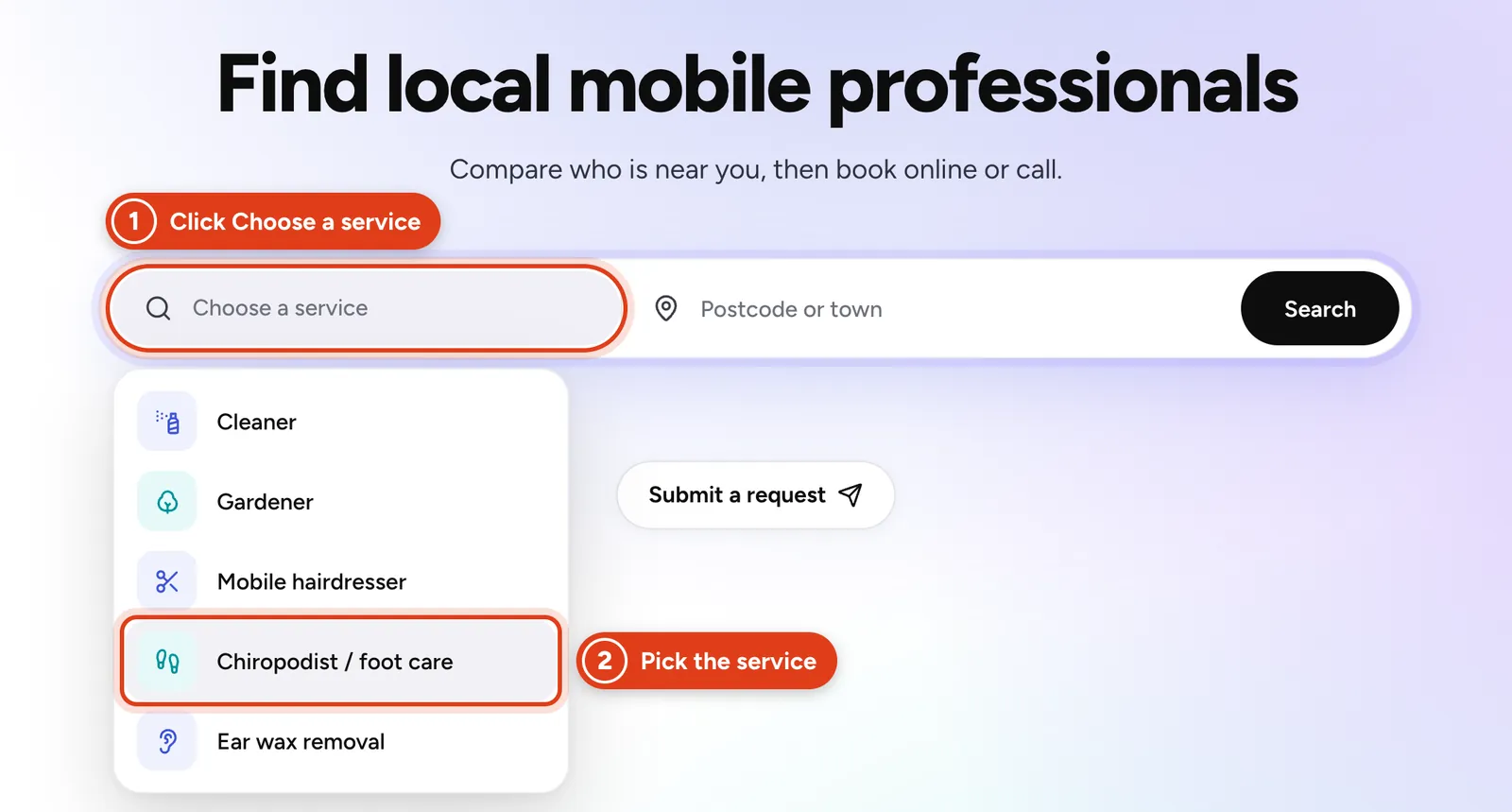
Go to localpickr.com. In the search box at the top of the page, click Choose a service and pick what you need.
 Open the picture full size
- 1Click Choose a service.
- 2Pick the service from the list. For foot care, choose Chiropodist / foot care.
Step 2 Type the postcode or town, then press Search
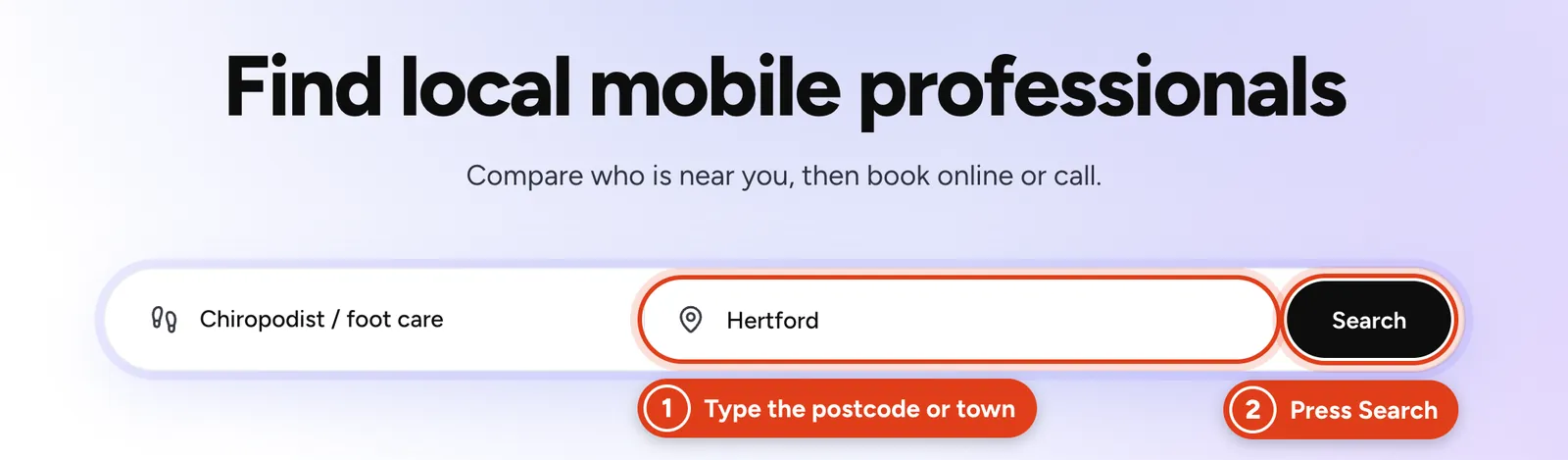
Type the postcode or town where the visit will be. If you're arranging it for someone else, use their postcode, not yours. You can also choose Current location to search where you are now.
 Open the picture full size
- 1Type the postcode or town of the home the professional will visit.
- 2Press Search.
Step 3 Compare who comes to your area
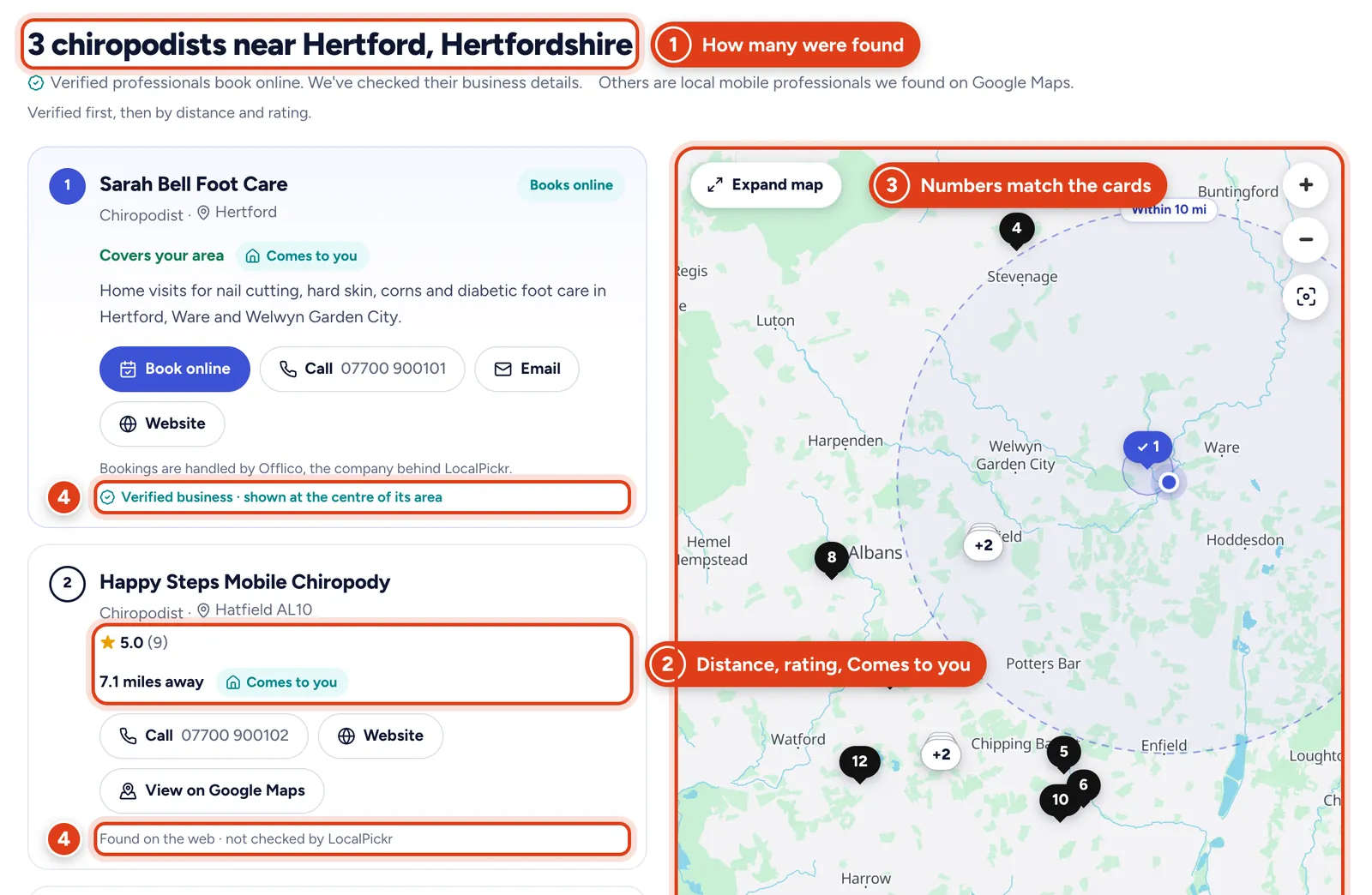
You'll see the local professionals LocalPickr found, on a list and a map. Each card shows how far away they are, or Covers your area, whether they come to you, and a star rating where there is one. The number on each card matches its number on the map.
Verified business means LocalPickr has checked the professional's business details. Verified businesses come first, and the ones that take online bookings have a Book online button. The others are local mobile professionals found on Google Maps, marked Found on the web · not checked by LocalPickr.
 Open the picture full size
- 1How many professionals were found near the postcode or town.
- 2Each card shows the distance or Covers your area, Comes to you, and a star rating where there is one.
- 3The map. Its numbers match the cards.
- 4Every card says Verified business or Found on the web · not checked by LocalPickr.
Step 4 Book online, call, email or look at their website
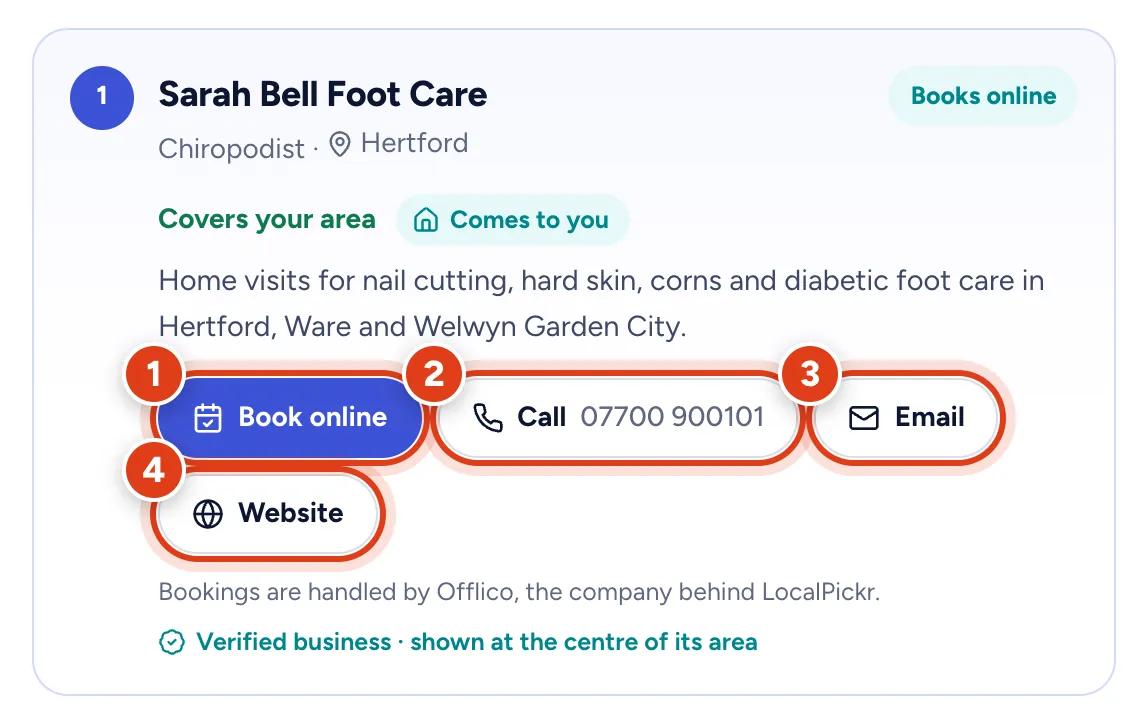
Use the buttons on each card to get in touch. Book online opens the professional's booking page in a new tab, where you choose a time. For the others, call or email them, or look at their website.
Before you agree a visit, ask about the price, what's included and when they can come. The checks at the end of this guide help.
 Open the picture full size
- 1Book online opens their booking page, where you choose a time.
- 2Call shows their number. On a phone, press it to ring them.
- 3Email opens an email to them.
- 4Website opens their own website.
Or send a free request
Can't find who you need, or would you rather someone got in touch with you? Send a request instead. It's free to send, there's no obligation to book, and your request isn't shown publicly.
Step 5 Press Submit a request
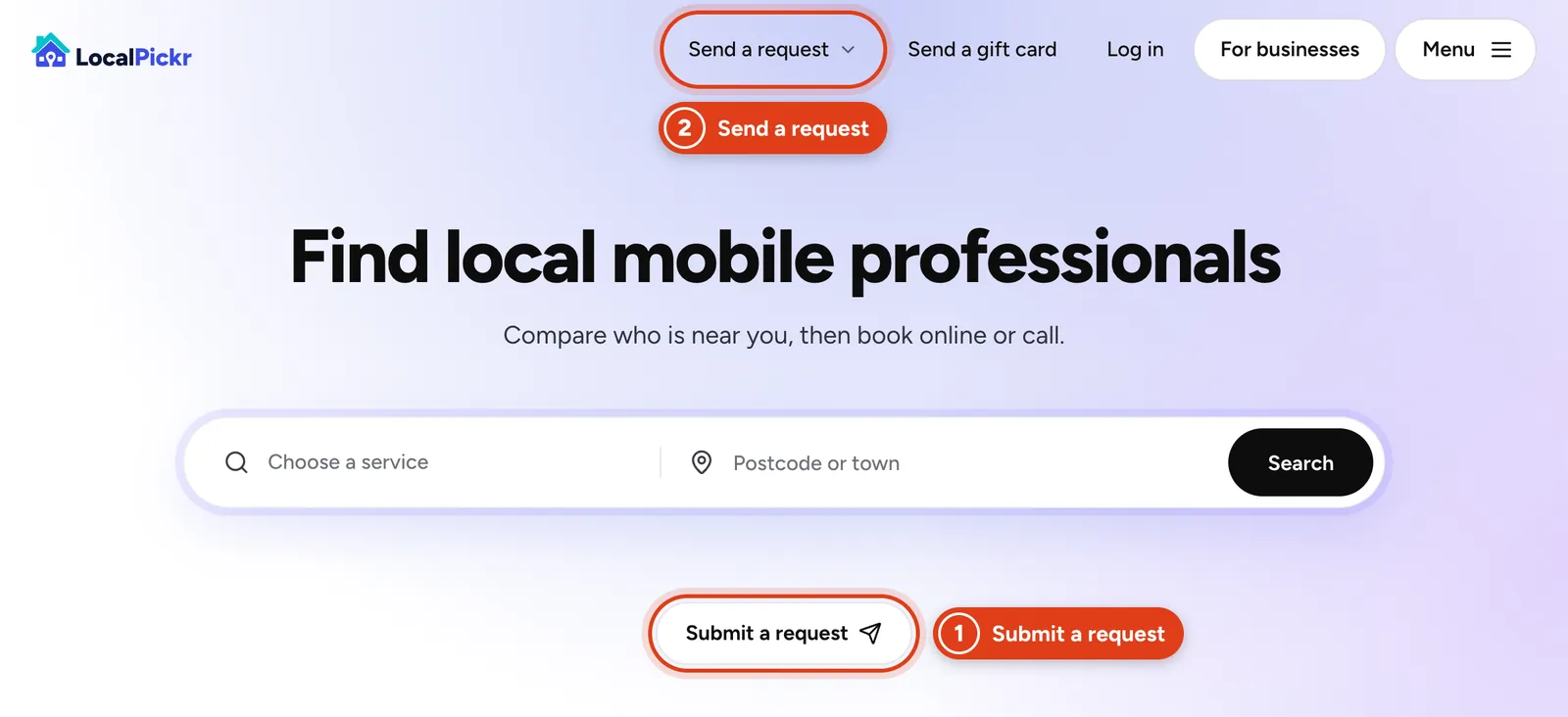
On the home page, press Submit a request under the search box. On a computer you can also use Send a request at the top of the page. On a phone, it's in the Menu.
 Open the picture full size
- 1Submit a request, under the search box.
- 2Send a request, at the top of the page.
Step 6 Choose the service
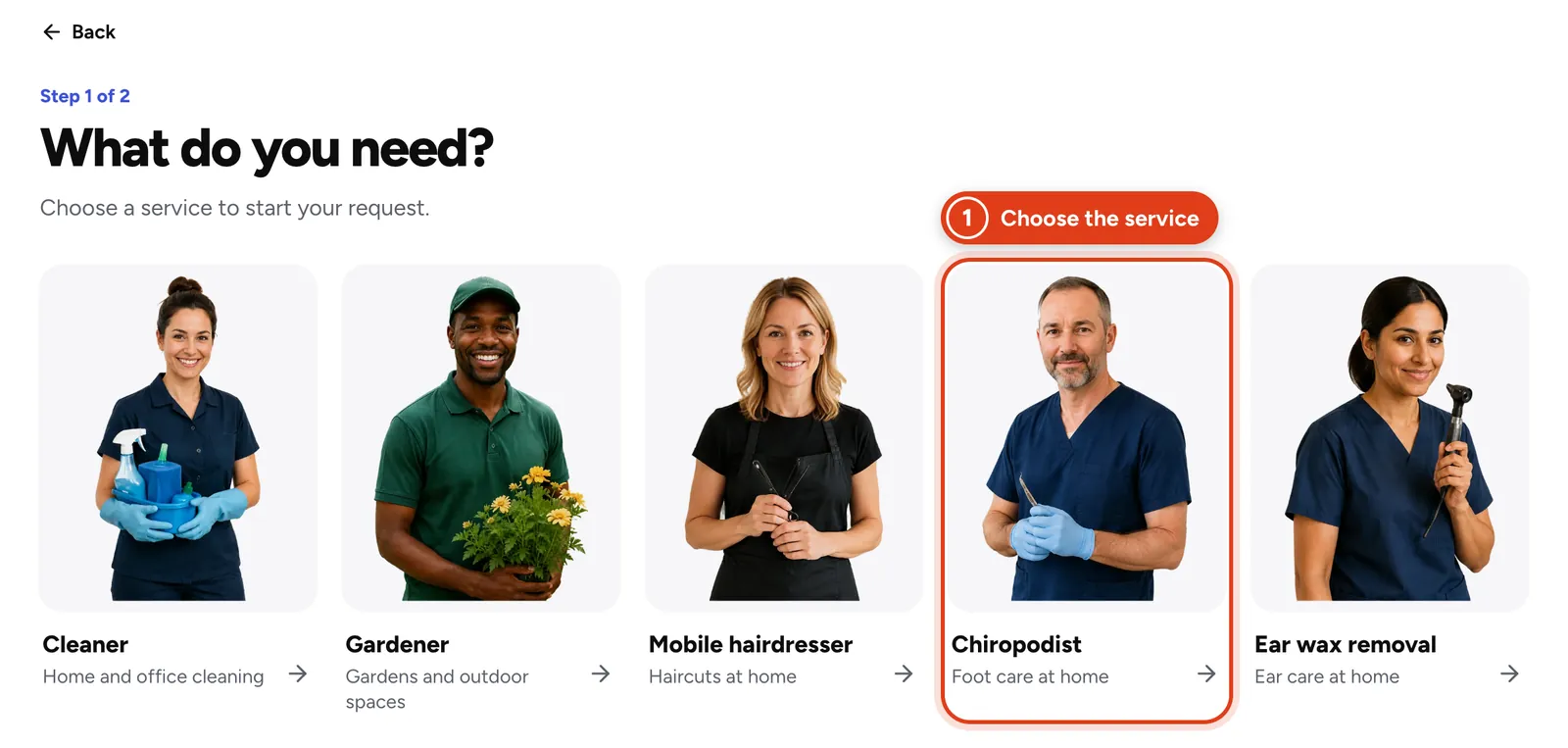
Press Send a request, then choose what you need. This is step 1 of 2.
 Open the picture full size
- 1Choose the service you need.
Step 7 Fill in the request
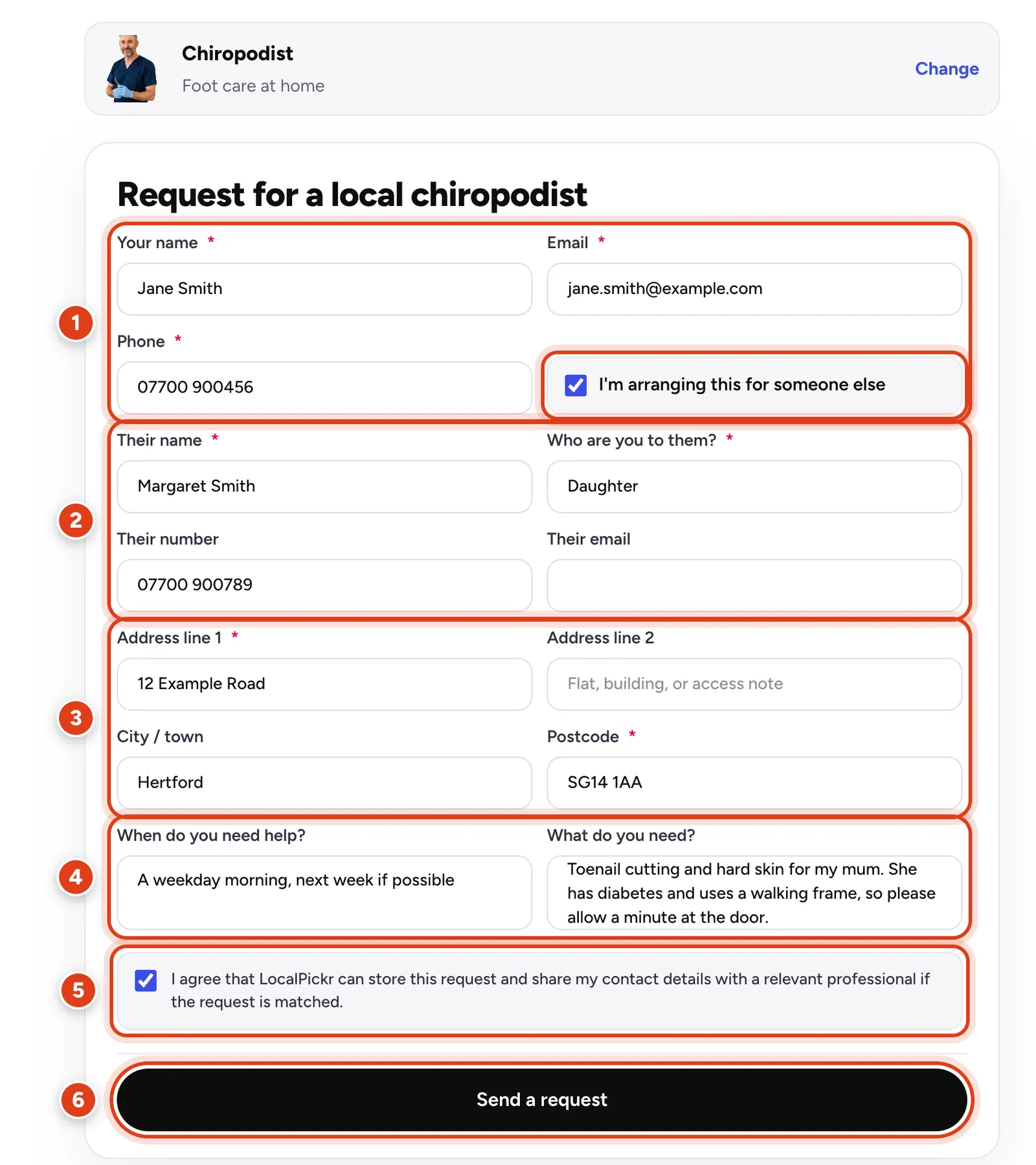
Add your name, email and phone number, the address of the visit, when suits and what you need. Things worth saying: health or access notes (diabetes, a walking frame, stairs, a key safe, parking, pets), your budget, and how soon you need someone.
Arranging it for someone else, such as a parent? Tick I'm arranging this for someone else and add their name and who you are to them. Their number and email are optional. Use their address for the visit.
 Open the picture full size
- 1Your name, email and phone number.
- 2Tick I'm arranging this for someone else when the visit is for someone else, then add their details.
- 3The address of the visit. Address line 1 and the postcode are needed.
- 4When suits, and what you need.
- 5Tick to agree that LocalPickr can store your request and share your contact details with a relevant professional if it's matched.
- 6Press Send a request.
Step 8 What happens next
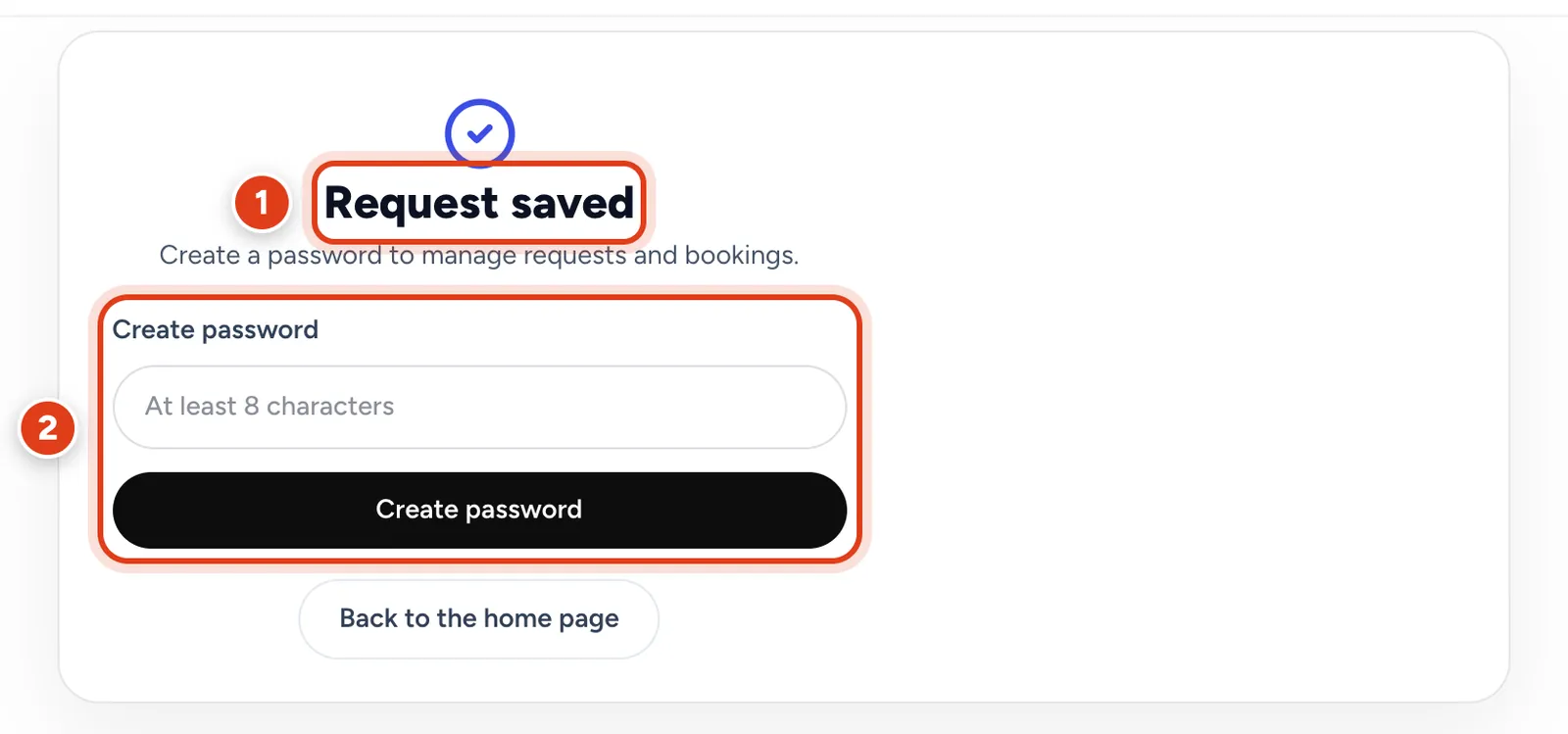
You'll see Request saved, and LocalPickr emails you a link to manage your request. LocalPickr looks for a suitable local business for the job, and only that business gets your contact details. If they can help, they get in touch to talk it through. You agree the price and the visit with them.
To keep track of your requests and bookings, create a password here. Later, use Log in to see them.
 Open the picture full size
- 1Your request is saved.
- 2Create a password to manage your requests and bookings.
Before the first visit: a few checks
LocalPickr doesn't check qualifications, insurance or DBS. Whoever you choose, these checks take a few minutes.
- Agree the price in writing: what's included, any travel charge, how to pay, and how much notice you need to give to cancel. A text or email is fine.
- Insurance: ask whether they have public liability insurance and, for foot care and ear care, professional indemnity insurance.
- Chiropodists and podiatrists: these titles are protected by law. Look up their name on the HCPC register: search online for "HCPC check the register".
- Foot health practitioners aren't on the HCPC register. Ask which professional body they belong to, and about their training and insurance.
- Ear wax removal: ask which method they use, such as microsuction or irrigation, and what training they have.
- Someone who'll have a key, or work alone with someone vulnerable: ask to see a basic DBS check (a Level 1 disclosure in Scotland, a basic AccessNI check in Northern Ireland).
- Share health and access notes before the visit, and say who will be at home.
If something goes wrong
- Nobody has got back to you, or you want to report a professional: use the form on localpickr.com/help/.
- A concern about a chiropodist or podiatrist: you can raise it with the HCPC.
- Cancelling a service: Citizens Advice explains your rights.
Sources (checked 13 November 2026)
- HCPC, Check the Register
- HCPC, Professions and protected titles
- HCPC, Concerns
- Royal College of Podiatry, What is the difference between a podiatrist and a foot health practitioner?
- NHS, Earwax build up
- GOV.UK, Request a basic DBS check
- mygov.scot, Apply for a Level 1 disclosure
- nidirect, AccessNI criminal record checks
- Citizens Advice, Cancelling a service you've arranged